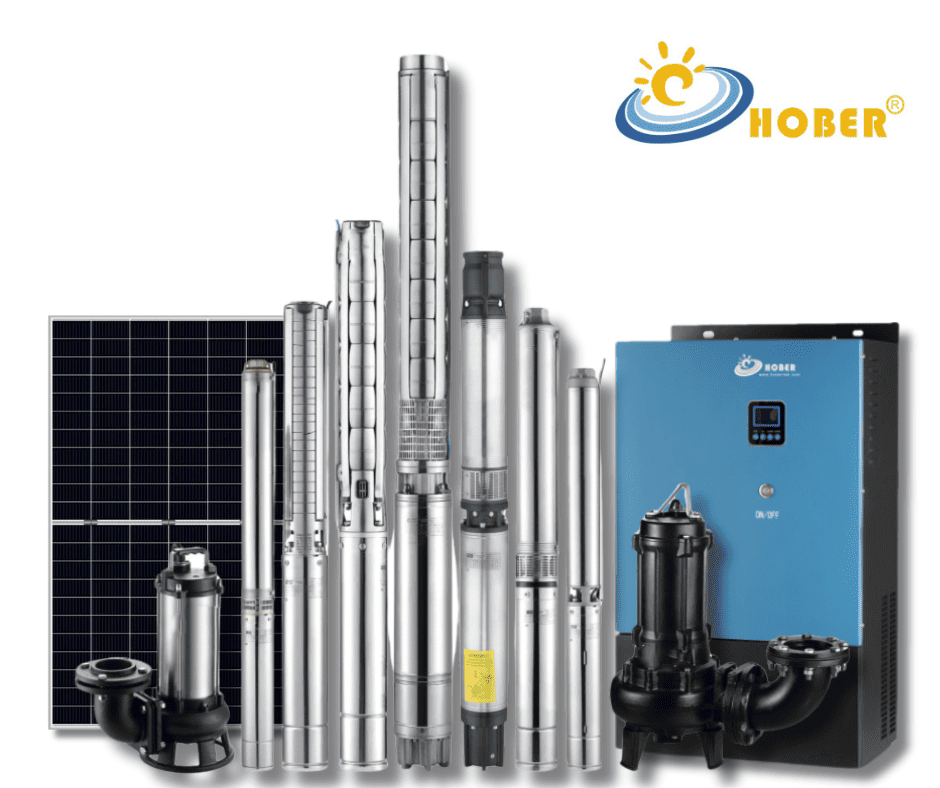
A solar pumping system is designed for long-term water supply in irrigation, borehole water projects, livestock watering and rural water applications. However, even a well-designed system may face alarms, low water output, unstable operation or abnormal display status during daily use.
For solar pump distributors, pump installers and irrigation contractors, fast troubleshooting is very important. A clear troubleshooting process can reduce site visits, shorten downtime and protect both the inverter and the pump motor.
This guide explains how to diagnose common solar pumping system problems from four key dimensions:
Error code analysis, pump output performance, display and status abnormality, and preventive maintenance inspection.
Why Troubleshooting Matters in Solar Pumping Projects
In many solar water pumping projects, the operating environment is not simple. The system may work under high temperature, weak sunlight, dusty conditions, long cable distance, unstable water level and heavy daily load.
Common problems include:
- Solar pump inverter error codes
- Pump running but water output is low
- Pump does not start
- Inverter LCD has no display
- System frequently restarts
- OFF PV L-Power status
- Over-temperature protection
- Motor overload or inverter overload
- Cable overheating
- Terminal arcing
- Motor insulation failure
If the root cause is not identified correctly, installers may replace the wrong component and create unnecessary after-sales cost.
A correct troubleshooting process should start from power supply, then check inverter status, then inspect cables, pump motor, water source, and finally the pipeline system.
1. Core Error Codes: What “E:” Alarms Mean
When the solar pump inverter LCD shows an error message starting with “E:”, it usually means the system has detected a protection fault. In many cases, the inverter may also give an alarm beep.
These faults should not be ignored. They usually require targeted inspection of wiring, load, motor condition, cooling or inverter parameters.
E:O-C Acc / Dec / Cnst — Over Current Protection
Over current is one of the most common inverter protection faults.
Possible Causes
The main causes may include:
- Output circuit short circuit
- Motor cable short circuit
- Acceleration time too short
- Deceleration time too short
- Torque boost setting too high
- Sudden load increase
- Pump mechanical blockage
- Internal inverter damage
Troubleshooting Method
First, disconnect the pump from the inverter output terminals. Then use an insulation resistance meter to check whether the motor cable and pump motor have short circuit or insulation failure.
If the fault only happens when the pump is connected, the problem is more likely related to the motor, cable, pump load or mechanical blockage.
If the inverter still reports over current without load, internal inverter damage may be possible and technical inspection is needed.
Recommended Actions
- Check motor cable insulation
- Check whether the pump is blocked
- Increase acceleration and deceleration time
- Reduce unreasonable torque boost setting
- Check whether the inverter power is suitable for the pump
- Contact technical support if the inverter alarms under no-load condition
E:O-V Acc / Dec / Cnst — Over Voltage Protection
Over voltage protection usually appears when the input voltage is too high or when the motor generates regenerative energy during deceleration.
Possible Causes
- PV input voltage is too high
- Grid input voltage is too high in hybrid mode
- Deceleration time is too short
- Motor is driven by external force
- System voltage setting is not suitable
Troubleshooting Method
Measure the actual input voltage and compare it with the inverter’s allowed voltage range. If the voltage is beyond the safe range, the system configuration must be corrected.
For solar applications, check the PV string design carefully. Too many solar panels connected in series may cause excessive open-circuit voltage, especially in cold weather.
Recommended Actions
- Adjust the input voltage to the normal range
- Recheck PV string voltage design
- Increase deceleration time
- Avoid excessive external mechanical force on the motor
- Confirm inverter voltage class matches the system design
E:Invt O-Ld / E:Motor O-Ld — Inverter Overload or Motor Overload
Overload faults mean the system is operating beyond the safe load range.
Possible Causes
- Pump load is larger than inverter capacity
- Motor is overloaded
- Pump is blocked by sand, mud or debris
- Cable loss is too high
- Cable size is too small
- Pump head exceeds design condition
- Wrong pump selection
- Inverter power is too small
Troubleshooting Method
Check whether the pump can rotate normally and whether there is mechanical blockage. For borehole pumps, also check whether sand or impurities are affecting the pump.
Measure the current during operation. If the current is higher than the rated value, the system may be overloaded.
Also check cable length and cable diameter. Long and undersized cables can cause serious voltage drop and heating.
Recommended Actions
- Check pump mechanical condition
- Clean the pump if blockage is found
- Use larger cable size if cable loss is too high
- Confirm actual head and flow requirements
- Select a larger inverter if the inverter is undersized
- Recheck pump and inverter matching
E:Input P-Lst / E:Output P-Lst / E:M P-G-S-C — Phase Loss or Short Circuit
Phase loss and phase-to-ground short circuit faults are serious electrical problems.
Possible Causes
- Three-phase input cable abnormal
- Three-phase output cable abnormal
- Loose wiring terminal
- Broken phase wire
- Motor cable insulation failure
- Phase-to-ground short circuit
- Water ingress in cable joints
- Poor cable connection inside borehole
Troubleshooting Method
Check the resistance of each phase cable. Then use an insulation resistance meter to test motor insulation and cable insulation.
For borehole pump systems, cable joints are a high-risk point. Poor waterproof treatment may cause leakage current or short circuit after the pump is installed underground.
Recommended Actions
- Check three-phase cable continuity
- Check phase-to-phase resistance
- Check phase-to-ground insulation
- Repair damaged cable or cable joint
- Improve waterproof sealing of cable joints
- Do not restart the inverter before the short circuit is removed
E:Invt O-Temp — Inverter Over-Temperature Protection
Over-temperature protection means the inverter temperature is too high.
Possible Causes
- Ambient temperature is too high
- Direct sunlight on the inverter
- Cooling fan failure
- Air duct blocked by dust
- Outdoor cabinet has poor ventilation
- Inverter is overloaded for a long time
- Installation space is too small
Troubleshooting Method
Check whether the fan is working normally. Then inspect the inverter cooling path and cabinet ventilation.
If the inverter is installed outdoors, check whether it is exposed to direct sunlight. Direct sunlight can significantly increase internal temperature and shorten component life.
Recommended Actions
- Clean the air duct and dust
- Replace damaged cooling fan
- Improve cabinet ventilation
- Avoid direct sunlight
- Keep enough installation space around the inverter
- Apply derating in high-temperature or high-altitude areas
2. Pump Output Performance Abnormal: Low Water Flow or No Water
Not all problems will show an error code. In many projects, the inverter may run normally, but the water output is low, unstable or completely absent.
This type of problem should be checked from electrical setting, solar energy input, water source, pipeline and pump condition.
Electrical and Parameter Causes
Motor Reverse Rotation
For three-phase AC pumps, wrong motor direction can cause low water output or no water.
If the pump is running but the water flow is very small, motor reverse rotation should be checked first.
Solution
Turn off the power first. Then swap any two wires among U/V/W output cables. After that, restart the system and check whether the water output improves.
MPPT Tracking or Parameter Setting Problem
If the MPPT tracking mode or PID parameters are not suitable, the inverter may not output the best available power from the solar panels.
This can reduce pump speed and water output.
Solution
For most standard applications, automatic MPPT mode is recommended. If PID mode is used, the parameters should be set according to the actual pump and PV system condition.
Energy and Solar Input Causes
Low water output may also be caused by insufficient solar power.
Common Causes
- Weak sunlight
- Cloudy weather
- Morning or evening operation
- Solar panel shading
- Dirty solar panel surface
- Bird droppings on panels
- Insufficient PV power configuration
- Fuse blown in the combiner box
- Cable overheating and power loss
Recommended Actions
- Clean the solar panel surface
- Remove shading from trees, buildings or poles
- Check whether the PV configuration is sufficient
- Check combiner box fuse condition
- Check whether DC cables are overheating
- Increase PV power if the system is under-configured
For solar pumping projects, PV sizing is very important. If the panel power is too small, the pump may run but cannot reach the expected flow rate.
Pipeline and Mechanical Causes
Sometimes the problem is not electrical. The inverter and motor may work normally, but the pipeline or pump condition limits water output.
Common Causes
- Pipeline has no water
- Air leakage in suction pipe
- Pipe diameter does not match
- Inlet blockage
- Filter blockage
- Pump is used beyond rated head
- Suction lift is too high
- Well water level is too low
- Pump impeller is worn
- Pump is blocked by sand or debris
Recommended Actions
- Check whether the water source is sufficient
- Check suction pipe sealing
- Check pipeline diameter
- Clean pump inlet and filter
- Confirm actual total head
- Check whether the pump selection is correct
- Inspect impeller condition if performance keeps dropping
A practical troubleshooting rule is:
Check from power supply → inverter → cable → pump → water source → pipeline.
This process helps avoid wrong judgment and unnecessary replacement.
3. Display and System Status Abnormal
Some failures appear as LCD display problems or special operating status rather than direct error codes.
No Display After Power On
If the inverter has no display after power on, the first step is to check the input side.
Possible Causes
- Solar input polarity reversed
- Combiner box fuse blown
- DC input voltage too low
- Internal cable or ribbon cable loose
- Internal power supply fault
Recommended Actions
- Check PV positive and negative polarity
- Measure DC input voltage
- Check combiner box fuse
- Reconnect internal cable if service is allowed
- Contact technical support if the input is normal but display is still off
Do not continue repeated power-on attempts before checking polarity and voltage.
Frequent Restart or OFF PV L-Power
If the LCD shows OFF PV L-Power, it usually means the inverter has entered low-power standby protection.
This is common during early morning, evening or cloudy weather when solar power is not enough.
Possible Causes
- Solar input power is insufficient
- PV array power is too small
- Solar panels are shaded or dirty
- L-Power standby frequency is set too high
- Pump head is high and needs higher starting power
Recommended Actions
- Check sunlight and PV power condition
- Clean solar panels
- Remove shading
- Check B1 menu low-power detection frequency
- Adjust L-Power standby setting according to pump condition
- Increase solar panel power if necessary
For example, for a deep well pump with around 70 meters head, the low-power protection frequency may need to be set around 35Hz depending on the actual site condition.
The correct setting should be based on the pump curve, water head, sunlight and actual operating frequency.
Warning Messages Starting with “W:”
Warning messages are different from error codes. In many cases, warnings do not stop the system immediately, but they indicate that some signal or setting should be checked.
Common Warning Examples
- W:Analog 20mA: analog signal abnormal
- W:System clock: system clock warning
Recommended Actions
- Check sensor wiring
- Check analog signal range
- Check whether the sensor is damaged
- Check system time setting
- Inspect signal cable shielding and grounding
Warnings should not be ignored, especially in systems using pressure sensors, flow meters or water level sensors.
4. Preventive Maintenance Inspection
The best troubleshooting is prevention. Many solar pumping system failures can be found before they become serious.
For distributors and installers, preventive inspection should become part of the service process.
Check Terminal Arcing Marks Monthly
Loose terminals can cause arcing, overheating and fire risk.
Monthly Inspection Points
- Check whether terminals are loose
- Check whether connectors are overheated
- Check whether there are black marks or burning marks
- Check whether cable insulation is damaged
- Check whether the cable joint is secure
If arcing marks are found, the system should be stopped and repaired immediately.
Check Capacitor Health Every Year
Capacitors inside the inverter are lifetime components. Their condition is strongly affected by heat, humidity and long operating hours.
Inspection Points
- Check for liquid leakage
- Check for bulging
- Check for deformation
- Check for abnormal smell
- Check for burn marks
If abnormal capacitor condition is found, replacement is recommended.
Under normal operating conditions, preventive capacitor replacement is generally recommended every 5 years.
EMI and Long Cable Protection
Electromagnetic interference and long motor cables can also cause unstable system operation.
Recommended Practices
- Ensure good grounding
- Use shielded cable for sensors
- Keep signal cables away from power cables
- Arrange signal cables perpendicular to power cables where crossing is unavoidable
- Avoid running sensor wires together with motor power cables
If the cable distance between the inverter and pump is over 100 meters, an AC output reactor is recommended.
Long cables may create distributed capacitance, voltage spikes and resonance. This can damage motor insulation and trigger overcurrent protection.
An AC output reactor helps protect the motor and improve system reliability.
Keep the System Clean and Ventilated
Solar pumping systems often work in outdoor environments. Dust, heat and poor ventilation are common risks.
Recommended Actions
- Clean inverter surface regularly
- Keep air duct clear
- Check the cooling fan
- Keep outdoor cabinet ventilated
- Avoid direct sunlight on the inverter
- Clean solar panels regularly
Good ventilation is not only about avoiding alarms. It directly affects inverter lifetime.
Practical Troubleshooting Flow for Installers
When a solar pumping system has a problem, use the following process:
- Check PV input voltage and polarity
- Check inverter LCD status or error code
- Check wiring terminals and cable condition
- Check motor insulation and phase resistance
- Check whether the pump is blocked or overloaded
- Check water level and water source
- Check pipeline leakage, blockage and pipe diameter
- Check PV power, shading and panel cleanliness
- Check fan, cooling path and installation environment
- Check whether long cable protection is required
This method helps identify the real root cause step by step.
Common Troubleshooting Mistakes
Many after-sales problems become worse because the first diagnosis is wrong.
Common mistakes include:
- Replacing the inverter before checking motor insulation
- Ignoring pump reverse rotation
- Ignoring loose terminals
- Ignoring solar panel shading
- Ignoring cable voltage drop
- Using undersized cables for long-distance pump systems
- Not installing an AC output reactor when cable distance is over 100 meters
- Treating OFF PV L-Power as inverter damage
- Ignoring fan failure and poor ventilation
- Not checking water level in the well
Installers should avoid judging the inverter as defective before checking the full system.
Conclusion
Solar pumping system troubleshooting should not rely on guesswork. A professional diagnosis should combine error code analysis, pump output inspection, display status checking and preventive maintenance.
For B2B solar pump distributors, installers and project contractors, a structured troubleshooting process can reduce after-sales cost, improve service response and protect local reputation.
The most important principle is:
Do not only check the inverter. Check the complete system.
A solar pumping system includes PV panels, inverter, cables, pump motor, water source, pipeline and sensors. Any weak point can affect the final water output and system stability.
Regular inspection, correct installation and proper maintenance can make the system more stable, reduce downtime and extend service life.
FAQ
What does E:O-C mean on a solar pump inverter?
E:O-C usually means over current protection. It may be caused by output short circuit, motor cable fault, pump blockage, acceleration time too short or sudden load increase.
What does OFF PV L-Power mean?
OFF PV L-Power means the inverter has entered low-power standby protection. It is usually caused by insufficient solar power, weak sunlight, panel shading, dirty panels or low-power detection frequency setting.
Why is my solar pump running but water output is low?
Possible causes include motor reverse rotation, insufficient solar power, dirty panels, MPPT parameter problem, pipe leakage, inlet blockage, water level shortage, excessive head or worn impeller.
Why does the inverter show no display after power on?
Possible causes include PV input reverse polarity, blown fuse in the combiner box, low DC voltage, loose internal cable or internal power supply fault.
When should an AC output reactor be installed?
If the cable distance between the inverter and the pump is over 100 meters, an AC output reactor is recommended to protect motor insulation and reduce overcurrent risk.
How often should terminals and connectors be inspected?
Terminals and connectors should be inspected at least once per month. Check for looseness, overheating, discoloration and arcing marks.
How often should inverter capacitors be replaced?
Under normal conditions, preventive capacitor replacement is generally recommended every 5 years. In harsh high-temperature environments, the inspection interval should be shorter.